
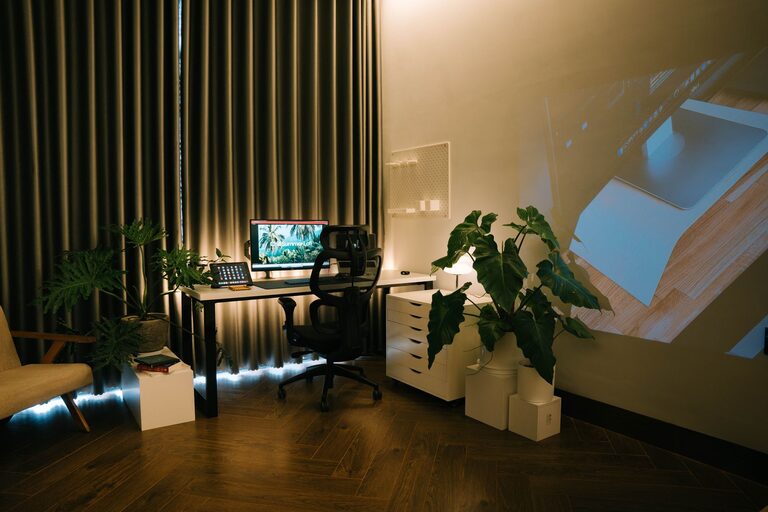
Creating a home office that is both cozy and productive can greatly enhance your remote working experience. Whether you work from home full-time or occasionally, designing a space that supports focus and comfort is essential. In this post, we’ll explore practical tips and ideas to help you build a home office that feels inviting and encourages work efficiency.
Why a Cozy and Productive Home Office Matters
Your home office isn’t just a place to get tasks done; it’s where you spend significant hours of your day. When your workspace is comfortable and well-organized, you’re more likely to stay motivated and complete your work efficiently. A cozy setup reduces stress and fatigue, while productivity elements keep distractions at bay.
Step 1: Choose the Right Location
Find a Quiet Corner
Select a spot in your home where interruptions are minimal. Ideally, choose a room or a quiet corner that separates work from your personal life. This separation will help you focus during work hours and relax when the day is done.
Consider Natural Light
Natural light has been proven to improve mood and energy levels. Try to position your desk near a window to benefit from daylight. If natural light is limited, invest in high-quality, adjustable lighting that mimics daylight.
Step 2: Invest in Ergonomic Furniture
Comfortable Chair
A good office chair is crucial. Look for ergonomic chairs that support your back and encourage good posture. Adjustable features such as seat height and lumbar support make a significant difference in comfort.
Desk Space
Choose a desk that suits your needs and fits the available space. It should be large enough to hold your computer, accessories, and documents, allowing you to work without feeling cramped.
Standing Options
If you prefer, consider a desk that can switch between sitting and standing. Standing desks can reduce discomfort and improve circulation during long workdays.
Step 3: Organize Your Space Effectively
Declutter Regularly
Keep your workspace tidy and free of unnecessary items. A clutter-free desk reduces distractions and helps you stay focused.
Storage Solutions
Use shelves, drawers, and organizers to store supplies and paperwork neatly. Clear containers and labeled bins make it easier to find what you need quickly.
Cable Management
Tidy up cables and cords with clips, sleeves, or boxes to avoid a messy look and prevent tripping hazards.
Step 4: Personalize Your Workspace
Add Plants
Plants not only improve air quality but also add a touch of nature and calmness to your office. Choose low-maintenance plants like succulents or pothos if you don’t have a green thumb.
Decorations and Art
Incorporate items that inspire you, such as artwork, photos, or motivational quotes. Personal touches make your office feel welcoming.
Comfortable Textiles
Add soft elements like a cozy blanket or a cushioned seat pad. These small comforts can make a big difference in your overall experience.
Step 5: Optimize Lighting
Layered Lighting
Use a combination of ambient, task, and accent lighting to create a balanced atmosphere. A desk lamp with adjustable brightness can be especially useful during focused work sessions.
Avoid Glare
Position your monitor to avoid glare from windows or lights. Glare can cause eye strain and headaches, so consider blinds or curtains if sunlight is too strong.
Step 6: Minimize Distractions
Sound Management
If noise is a problem, use noise-canceling headphones or add soft furnishings like rugs and curtains to absorb sound. A white noise machine or app can also help maintain concentration.
Digital Organization
Keep your computer desktop and files organized for faster access. Use productivity apps or browser extensions to block distracting websites during work hours.
Step 7: Create a Routine and Set Boundaries
Defined Work Hours
Setting clear start and finish times helps maintain work-life balance. Communicate these hours to family or housemates to minimize interruptions.
Breaks and Movement
Schedule regular breaks to stretch and move around. Taking short walks or simple exercises can refresh your mind and prevent fatigue.
Final Thoughts
Designing a home office that is both cozy and productive doesn’t have to be complicated. With a thoughtful location, ergonomic furniture, good organization, and personalized touches, you can create a space that supports your best work while feeling comfortable and welcoming. Start small and adjust your setup as you discover what works best for you.
Remember, the goal is to blend comfort with functionality to make working from home a positive and productive experience. Happy decorating!